How to Create Cron Job?
How to Create a Cron Job in Web Hosting
Cron jobs let you run scripts or commands automatically at scheduled times. You can use them for backups, scheduled emails, website maintenance, Laravel tasks, or calling a URL.
Step 1: Open Scheduled Tasks
- Log in to your Lvato account.
- Select your hosting service: From the navigation menu, open the Services dropdown and select the hosting service you want to manage.
- Click Control Panel to open your hosting control panel.
- Find and open Scheduled Tasks.
Step 2: Create Scheduled Task
In the Command field of Create Scheduled Task form, enter the script or URL you want to run.
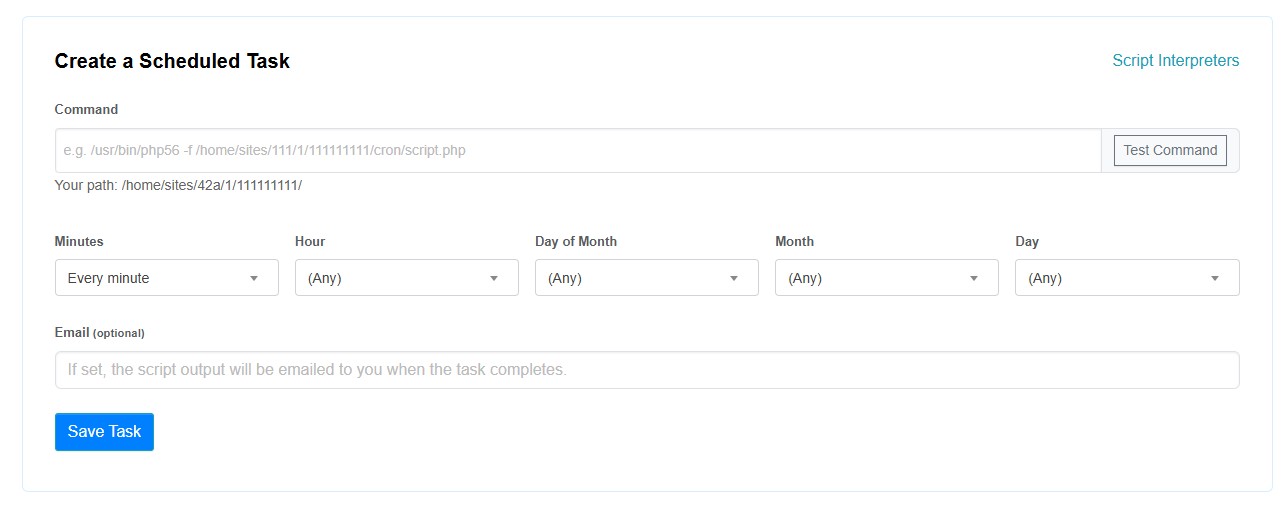 Example: Run a PHP script
/usr/bin/php83 -f /home/sites/aaa/1/111111111/cron/script.phpExample: Run a website URL using cURL
/usr/bin/curl -fsS https://example.com/cronReplace the example paths and URLs with your own. You can find your account's directory path below the Command field.
Step 3: Set the Schedule
Choose when you want the task to run using the available dropdowns.
| Field | Example |
|---|---|
| Minutes | Every 5 minutes |
| Hour | Any |
| Day of Month | Any |
| Month | Any |
| Day | Any |
For example, selecting Every 5 minutes with the remaining fields set to Any runs your task every five minutes.
Step 4: Test and Save
- Click Test Command to check your command.
- Optionally, enter an email address to receive the script's output.
- Click Save Task.
Your cron job is now scheduled to run automatically.
Available Script Interpreters
Lvato supports multiple PHP versions and other scripting languages for scheduled tasks.
| PHP Version | Interpreter Path |
|---|---|
| PHP 5.3 | /usr/bin/php53 |
| PHP 5.4 | /usr/bin/php54 |
| PHP 5.5 | /usr/bin/php55 |
| PHP 5.6 | /usr/bin/php56 |
| PHP 7.0 | /usr/bin/php70 |
| PHP 7.1 | /usr/bin/php71 |
| PHP 7.2 | /usr/bin/php72 |
| PHP 7.3 | /usr/bin/php73 |
| PHP 7.4 | /usr/bin/php74 |
| PHP 8.0 | /usr/bin/php80 |
| PHP 8.1 | /usr/bin/php81 |
| PHP 8.2 | /usr/bin/php82 |
| PHP 8.3 | /usr/bin/php83 |
| PHP 8.4 | /usr/bin/php84 |
| PHP 8.5 | /usr/bin/php85 |
Other supported interpreters:
| Language | Interpreter Path |
|---|---|
| Python | /usr/bin/python |
| Ruby | /usr/bin/ruby |
| Perl | /usr/bin/perl |
You can also use tools such as curl to trigger website URLs or external cron endpoints.
Important Notes
- Always use the full path to your script.
- Choose a PHP version compatible with your application.
- Use Test Command before saving to catch common errors.
- Avoid scheduling heavy scripts too frequently.
- If you use a URL-based cron job, make sure the endpoint is protected against unauthorized access.