Installing SSL
SSL Certificate Installation
Installation Guide
🔐 Step 1: Access Your Hosting
- Login to Lvato Dashboard Visit
https://my.lvato.com - From the nav menu Select Services -> Manage Hosting -> Manage
- Now click the cPanel Button on your active hosting plan.
🗂 Step 2: Open the SSL/TLS
- In the Control Panel dashboard, scroll to the Security section
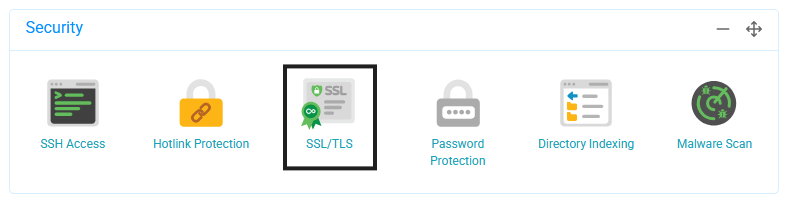
- Click on SSL/TLS
🔒 Step 3: Install Free SSL Certificate
Lvato provides free SSL certificates:
- From Wildcard SSL Certificate section look for the domain to secure
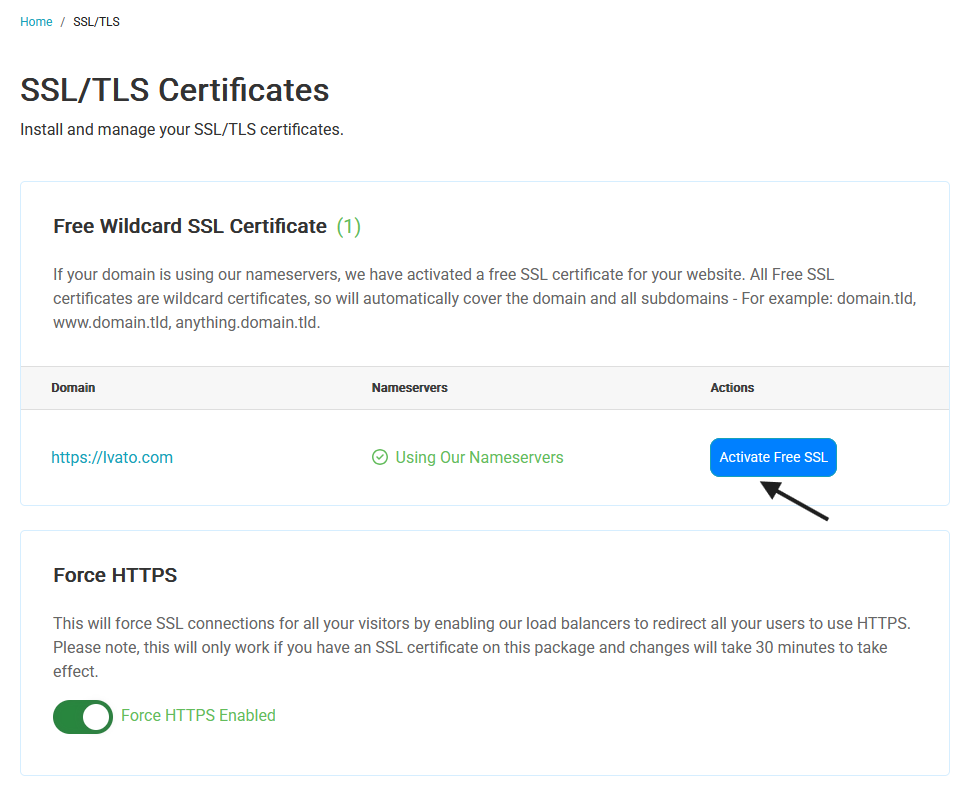
- See the status of nameservers if not using then apply the our nameservers.
- You can Click to Activate Free SSL to install free ssl certificate process takes a few minutes.
- Verify installation after 30 minutes check for green padlock in browser
Benefits of SSL
- Security - Encrypts data between browser and server
- Trust - Visitors see secure connection indicator
- SEO Benefits - Google favors HTTPS sites
- Required for commerce - Essential for online stores