

computer

How to upload your files to server using Lvato sPanel

Uploading files by lvato hosting control panel to your website is very easy and efficient way. To upload files to server you need to login to your control panel you will see the Dashboard Now from dashboard find the option similar to file manager and open it.
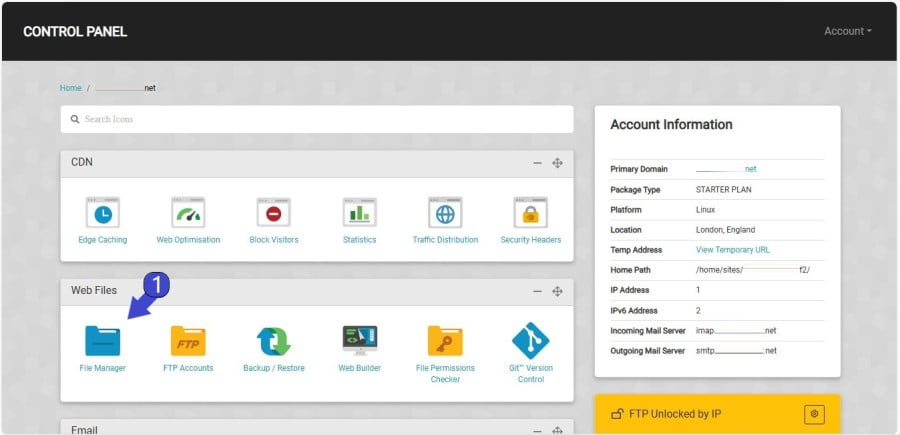
Dashboard Lvato

It will open file manager page where it will show the folders you need to open public_html folder which is connected to your primary domain if you have another domain you need to navigate to folder associated with that domain.
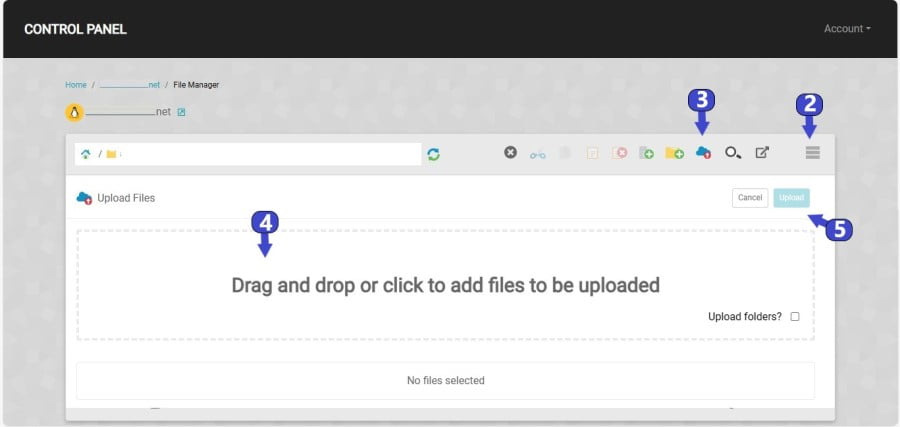
Lvato Hosting sPanel File Manager

Click to the menu from the File manager and click to upload button. Drag and drop your file which you want to upload to server and then you will click to upload. Done it will start the uploading of file.

Note* Do not leave page while uploading the file it will ruin the file uploading progress .

Related Articles

VPS vs Shared Hosting: What Is Best for You in 2026?

When you are running a website, you have a lot of different choices you need to make, and one of the most important ones is the hosting service you choose for your website. In this article, we are going to discuss the difference between VPS hosting and shared hosting...

How to Choose the Right Web Hosting Plan

Choosing the right web hosting plan that fulfills your needs and fits your budget can be confusing as there are a lot of companies which claim to be the top 10 or top 5 providers. Lets see what plan you should use for your website. Defining needs for the website? As...

Make Website Speed Faster and Improve Performance

Website speed is a critical factor in delivering a great user experience and improving your website's overall performance. A fast website not only helps in reducing bounce rates but also boosts your SEO rankings, improves conversion rates, and enhances customer...